
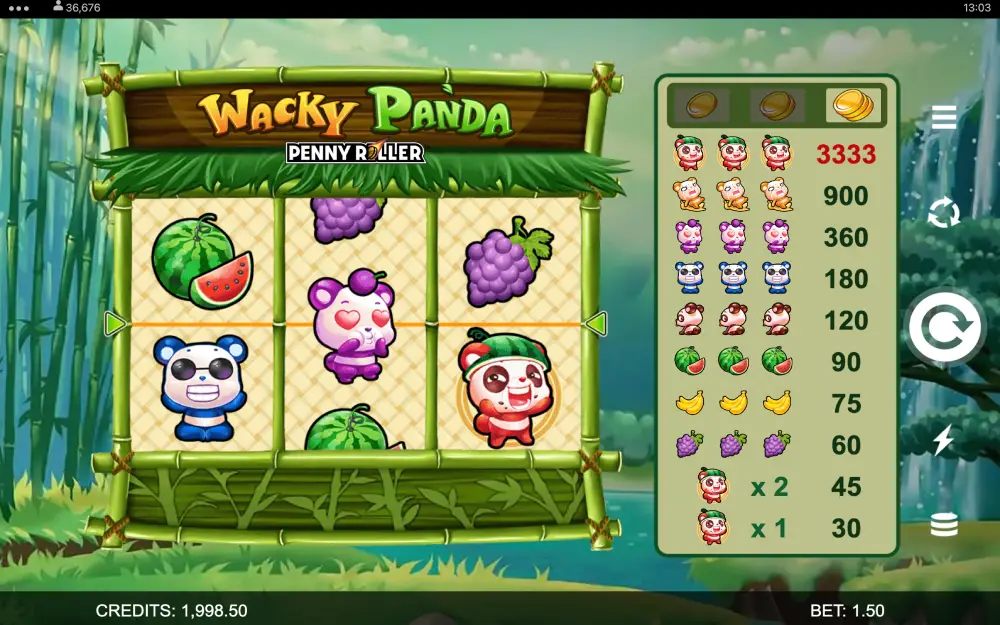
Wacky Panda Demo: Play for Free Instantly
The Wacky Panda demo loads in your browser with virtual credits, no account, no deposit, no email. You get the full 3-reel, single-payline Games Global build, identical math to the real-money version, just without cash on the line.
Use it to learn the paytable, see how often the panda Wild lands, and decide whether the volatility actually fits your bankroll before you commit a single dollar.
How to Use the Wacky Panda Free Demo

The demo runs straight from the page above. No installer, no Flash, no plugin. Click the play button, wait two or three seconds for the Games Global instance to load, and the reels are live with a virtual balance.
Bet controls
- Coin value — adjust with the +/- buttons next to the stake. Wacky Panda uses a single coin per spin on its lone payline, so your coin value is your total bet.
- Spin — the large central button. One click, one spin, one outcome.
- Autoplay — sets a fixed number of automatic spins at your chosen stake. Useful for sampling 50–100 spins quickly to feel the variance.
- Paytable — opens the symbol payouts and rules. Read it once before you spin; the panda Wild multiplier is the entire reason this game exists.
If the demo won't load
Clear cache, disable any aggressive ad-blocker on this domain, and refresh. Some Canadian ISPs throttle game-server CDNs at peak hours; switching from Wi-Fi to mobile data usually fixes it. The demo never asks for personal details. If a popup demands an email or phone number, you're not on the official demo build.
For a full breakdown of mechanics and RTP, see the Wacky Panda slot review.
Demo Mode vs Real Money Play: Key Differences

The math engine is the same. The RNG is the same. What changes is everything wrapped around the spin.
| Feature | Demo Mode | Real Money |
|---|---|---|
| Balance | Virtual credits, refilled on reload | Your deposited funds |
| RTP | Identical to real-money build | Identical to demo build |
| Wins | Cannot be withdrawn | Withdrawable, subject to casino terms |
| Bonus eligibility | None — demo doesn't trigger welcome offers or wagering | Yes, when played at a partner casino with bonus active |
| Account / KYC | Not required | Required by Canadian licensed operators |
| Session limits | None enforced | Deposit, loss, and time limits via responsible-gambling tools |
| Jackpot contributions | Not applicable | Applicable where the operator runs a network jackpot |
An honest warning about demo streaks
A hot session in free play tells you nothing about what happens with cash. The sample size is too small. Volatility is real, and a 3-reel slot like this can run cold for hundreds of spins. Treat the demo as a feature tour, not a forecast. If a site or video tells you a slot is "due" because the demo paid well, close the tab.
What to Practice in Demo Before Playing for Real

Free play is most useful when you have a checklist. Spinning randomly for an hour teaches you nothing. Targeted practice teaches you a lot.
1. Map the paytable from memory
By the end of your demo session you should know, without opening the info screen, which symbol pays what at full coin and what the panda Wild does to a winning line. If you can't recall it, you're not ready to bet cash.
2. Time the hit frequency
Run 200 demo spins at a fixed stake and count how many produced any payout. That ratio is your rough hit frequency. Compare it against the swing of your bankroll. A low hit rate plus a small bankroll equals a short session.
3. Test the Power Combo feature
The Power Combo is the standout mechanic in this title. Use the demo to see how often it lands, how the multiplier stacks, and whether the volatility profile matches what you want from a session. Once you move to cash, you won't want to be learning the feature on your own dime.
4. Set and rehearse limits
Pick a notional bankroll, say 100 credits, and play as if it were real. When it's gone, stop. The point is muscle memory: a stop-loss only works if you've practised hitting it.
5. Decide if the game is for you
Some players will find a 3-reel, 1-payline slot thin after 50 spins. Others love the simplicity. Demo mode answers that question for free, instead of after a $50 deposit. If you do move on to cash, the Wacky Panda strategy guide covers stake sizing, and the free spins and bonus offers page lists current Canadian promotions. Always check our responsible gambling tools before depositing.
+18 | Please gamble responsibly. No slot, demo or otherwise, guarantees a win.
Frequently Asked Questions
Is the Wacky Panda demo really free?
Yes. The demo runs on virtual credits supplied by Games Global. No deposit, no card details, no registration. Refreshing the page tops up your balance if you run out.
Do I need to download anything to play Wacky Panda free?
No. The Wacky Panda no download version runs in any modern browser on desktop or mobile. There is no app, no Flash player, and no plugin involved.
Does the demo have the same RTP as the real-money game?
It does. Games Global ships a single math model for Wacky Panda, and the demo uses the identical RNG and paytable. What differs is the consequence: demo wins are virtual and cannot be cashed out.
Can I win real money in Wacky Panda demo mode?
No. Demo credits are not redeemable. To play for real money you need an account at a licensed Canadian-facing casino that hosts the Games Global title, plus a verified deposit.
Does playing the demo help me predict real-money results?
It does not. Each spin is independent, and a hot or cold demo session has zero influence on what happens with cash. Use the practice mode to learn features and pacing, not to forecast outcomes.
Can I use a casino welcome bonus on the Wacky Panda demo?
No. Bonuses, free spins, and wagering only attach to real-money play at the operator. Demo sessions don't credit toward wagering requirements and don't trigger any promotion.
Is the Wacky Panda free play available on mobile?
Yes. The HTML5 demo scales to portrait and landscape on iOS and Android browsers. Performance depends on your connection, but the controls and paytable are identical to desktop.
How long can I play the Wacky Panda slot demo?
As long as you like. There is no session timer, no spin cap, and no forced sign-up. If your virtual balance runs low, reload the page and it resets.